Why duplicates pile up
Every tester writes in their own way. One writes “Expired promo code still applies discount”, another “Checkout lets you use old coupons”, a third pastes a failed Playwright assertion. They use different spreadsheets, Word documents and PDFs, with different columns. Before anyone can fix anything, someone, usually the QA lead, has to read every report and work out which ones are the same bug.
On a sprint with a few testers that is easily an afternoon of copy-paste. Worse, it is easy to get wrong: two different bugs merged by mistake, or one bug filed twice so two developers fix it at once.
Why search and keyword tools miss them
“Sort by Received: Apr, Aug, Dec, Feb… alphabetical.”
“In the admin queue when I sort by date the order is strange, it sort by name of month not by date. February is before January.”
Most tools look for shared words. The two reports above describe the same bug, but they share almost none: one tester lists the months, the other describes the symptom in their second language. A keyword search never puts them together, and “similar issues” suggestions in trackers have the same blind spot.
What works is matching by meaning: understanding that both describe a date sort ordering months alphabetically. That is what Distill’s AI model was trained to do, on thousands of bug reports.
Doing it by hand: a method that works
- Put every report into one sheet with the same columns: tester, area, title, description, severity.
- Sort by area (Checkout, Login, Search…), so likely duplicates sit next to each other.
- Read each area top to bottom and give matching reports the same group number. Judge by the symptom, not the wording.
- For each group keep the clearest title, the worst severity, and every tester’s name and steps.
- Check groups that only look alike: “orders page 2 is empty” and “orders CSV export is empty” are different bugs.
How Distill does it
- Drop in every reportExcel, CSV, Word, PDF, text, Markdown or a Playwright run, each tagged with the tester who wrote it. No reformatting first.
- The AI compares every issue with every otherBy meaning, by shared words and by area, and turns that into how likely two reports are the same bug.
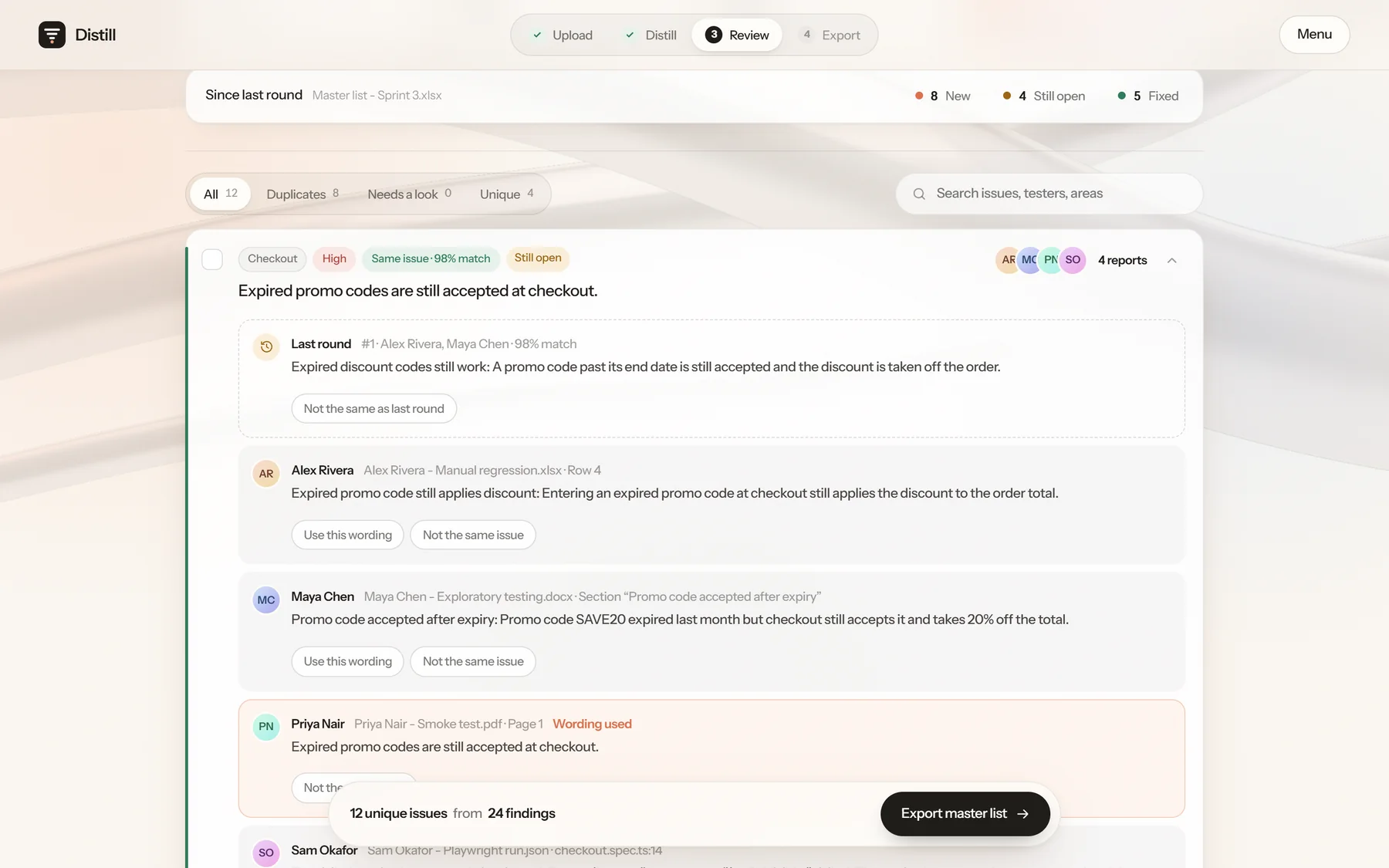
- You review the groupsClear duplicates are merged; borderline ones are flagged “Check this”. Every group says why it was grouped. Split, merge, rename or approve in a click.
- Export one clean listAn Excel report, an evidence pack, or a CSV for Jira or Azure DevOps, with every tester credited on every issue.
What it looks like on real numbers
Distill comes with four sample reports from four made-up testers (a manual regression sheet, exploratory notes in Word, a smoke test PDF and a Playwright run): 24 reports that come down to 12 real issues. The promo-code bug alone was reported four times, in four formats.
On a held-out benchmark of 211 realistic reports from three apps the model never saw while training, 97% of the merges Distill made were correct, and it found five times more duplicates than keyword matching. It is deliberately careful: about 58% of duplicate pairs are merged automatically, and the rest stay separate for you to merge, so mistakes are rare and easy to spot.
Questions
Does Distill delete or change my reports?
No. It reads them in memory and builds a new master list. Nothing is merged for good until you export, and you can split or merge any group.
Do testers have to change their templates?
No. Distill finds the header row in spreadsheets, reads headings and bullets in Word and PDF, and skips rows marked passed or fixed. Testers keep writing the way they do today.
How long does it take?
Seconds. The model compares 70 reports in about 0.3 seconds on an ordinary laptop. Reviewing the groups is the part that takes your judgement, and it’s minutes.